Automate order handling in your e-commerce store
How to automate order handling in your e-commerce store, from orders and shipping labels to inventory and returns. Step by step, with a real Telestore example.


Order in, shipping label out, parcel on its way, without a single manual click. That is what automated order handling looks like when everything lines up. The hard part, and the part that actually saves money, is the orders that do not.
This guide shows step by step how to automate order handling, with Telestore as the example: a Swedish e-commerce store for used phones where we built 56 automations. If you first want to see what AI does for an e-commerce business in general, read our overview of AI agents for e-commerce.
What does automating order handling mean?
To automate order handling means the steps between purchase and delivery are run by a system instead of a person. The order is captured, customer data is fetched, a confirmation and a shipping label are created, inventory is reconciled, and exceptions are flagged, without manual clicks at every step.
At Telestore, around 2.5 hours a week used to go to troubleshooting manual lists, and errors in the orders cost both money and customers. That is the friction the automation removes.
The point is not to chase the human away. It is to let the machine take the repetitive and predictable, so your time goes to the cases that genuinely need judgment. A good automation does the boring 80 percent itself and hands the hard 20 percent over to you, in a controlled way. Order handling is among the first things worth tackling, because the volume is high and the steps look the same every time. Shopify lists order handling among the processes AI can take over in e-commerce.
How do you bring all orders into one place?
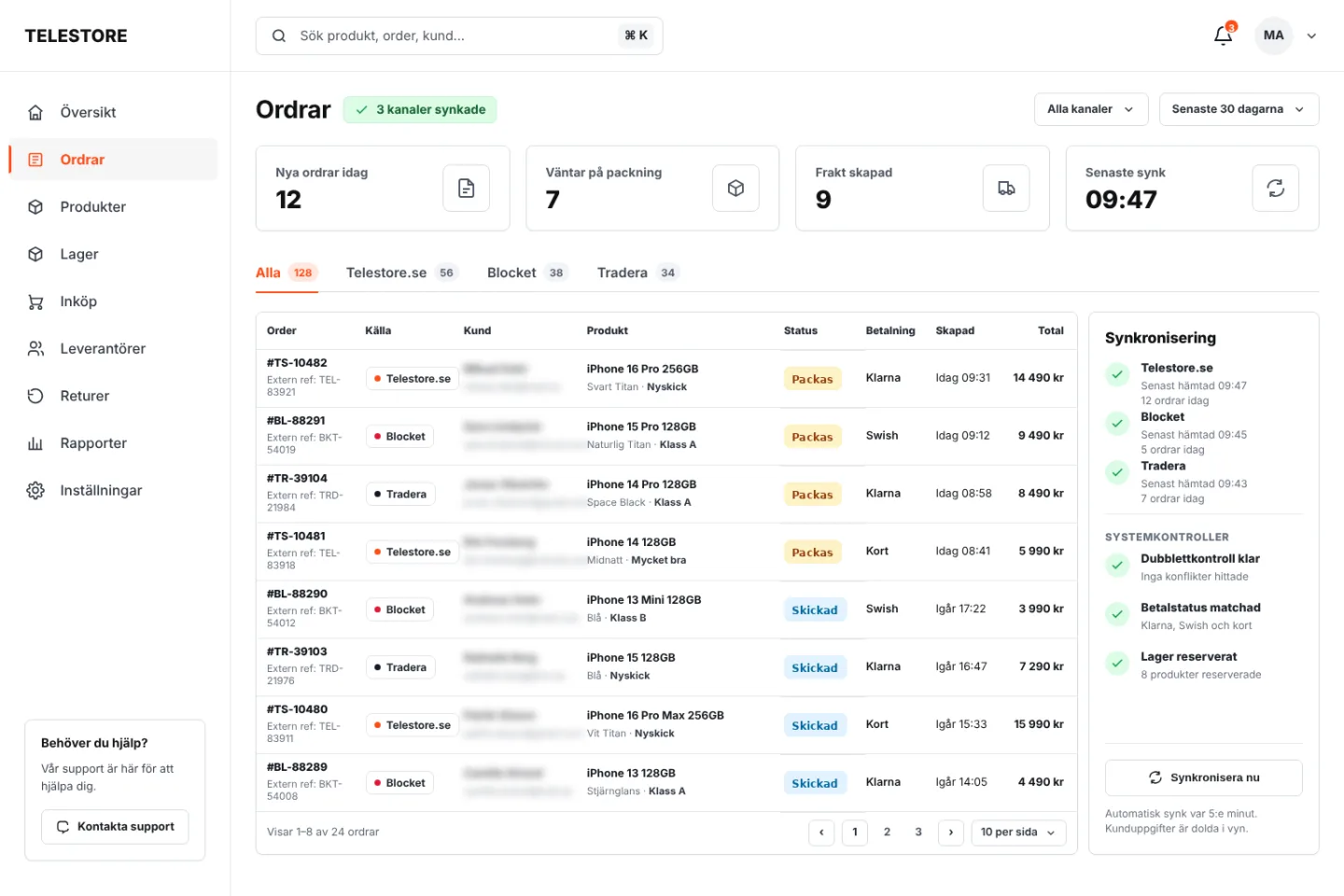
The first step is to gather all orders in one system, no matter which channel they come from. You cannot automate a flow that is spread across four logins. It all starts with the orders landing in the same place.
At Telestore, phones were sold in three places at once: their own site, Blocket, and Tradera. Before, that meant staff logged in to each one to see and handle orders. Now all three are connected to the same system, so every order, wherever it came from, shows up in a single flow. That is the core of an order management system (OMS): one view that owns the order flow regardless of channel.
Technically it happens through the platforms' APIs: each channel sends its orders to the same database, where they are translated into a common format. It sounds trivial, but this is where many manual errors are born, when the same order exists in three systems with small differences. When everything is mirrored to one source instead, the rest of the automation becomes reliable, because it always reads from the same truth. That is the invisible foundation: once the order lives in one place, everything else can be built on top.
How do you automate confirmation and shipping?
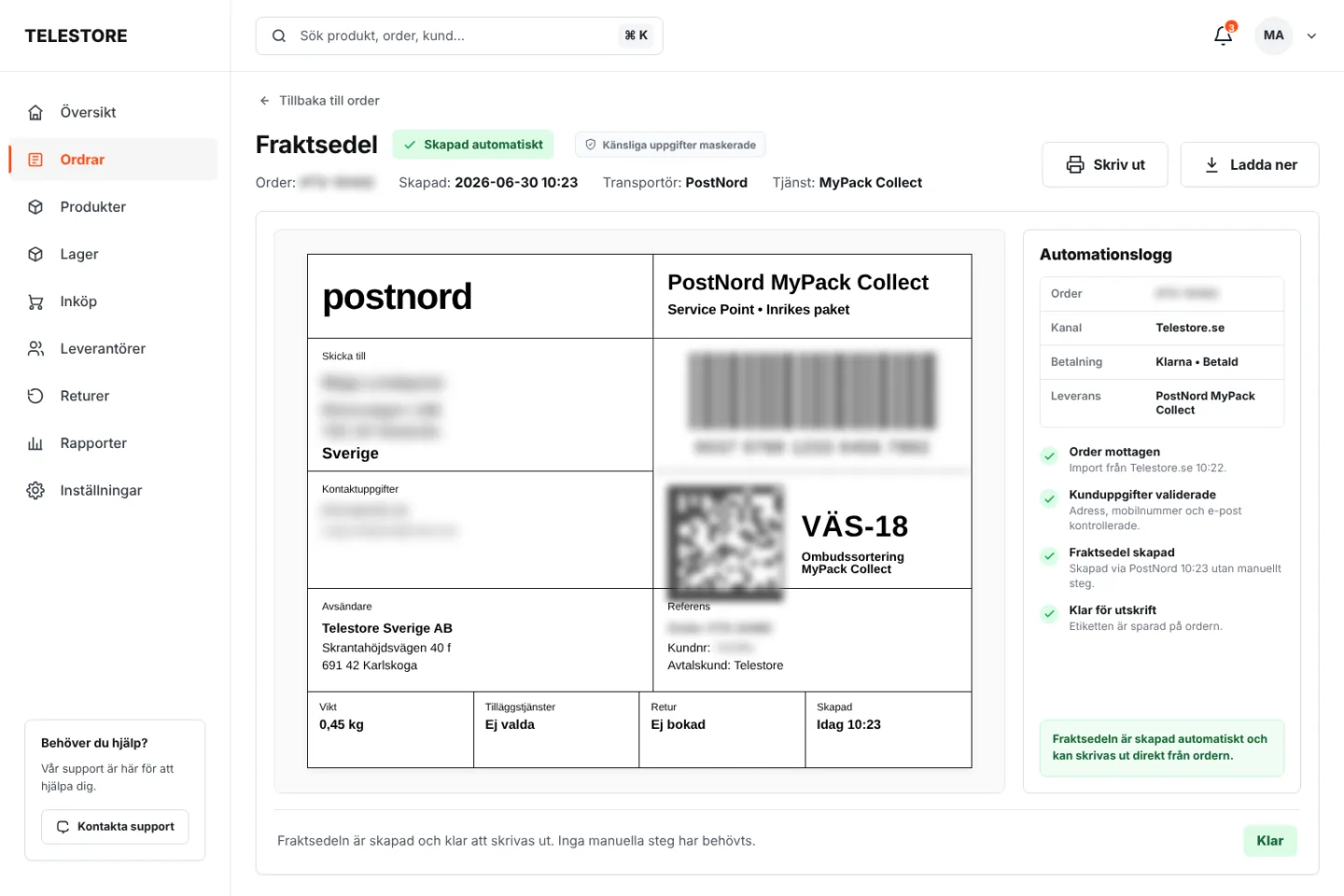
When an order comes in, the system fetches the customer's details, creates an order confirmation, and orders a shipping label automatically. At Telestore, the site, Blocket, and Tradera are connected to PostNord, so the right shipping label is generated directly without anyone typing the address by hand.
This is the step where time actually frees up. Telestore handles around 34 orders a week, and the order handling itself went from about ten minutes to two per order. The shipping labels, which used to be written one by one, are now handled fully automatically. Together the two steps free up several hours a week, time that used to go to copy-pasting between systems. It is better for the customer too: the confirmation arrives in seconds and the parcel can ship the same day, instead of waiting for someone to print a label.
What an automated order flow looks like
When an order lands, this happens:
- The order is captured from the channel it came in on, and the customer's details are fetched.
- An order confirmation is created and sent to the customer immediately.
- A shipping label is ordered automatically from the carrier, PostNord in Telestore's case.
- The inventory level is updated and any exceptions are flagged for a human.
None of the steps require anyone to log in and click.
The right customer data decides everything
This only works if the customer's details are correct. Since most pay with Klarna or similar, name and address have to match from the start, otherwise neither payment nor delivery goes through. The automation is therefore only as good as the data it gets in, which is what makes the first step, gathering everything in one place with the right details, so important.
We used to spend hours every week on manual tasks like writing shipping labels and confirming emails. Now Eteya handles all of it automatically. It has made us faster and less stressed.
 Brindar AkalpCEO, Telestore
How do you keep stock from running out?
An order you cannot fulfill is a failed order, so keeping stock filled is part of order handling. Here it pays to automate the monitoring, but not the purchase itself.
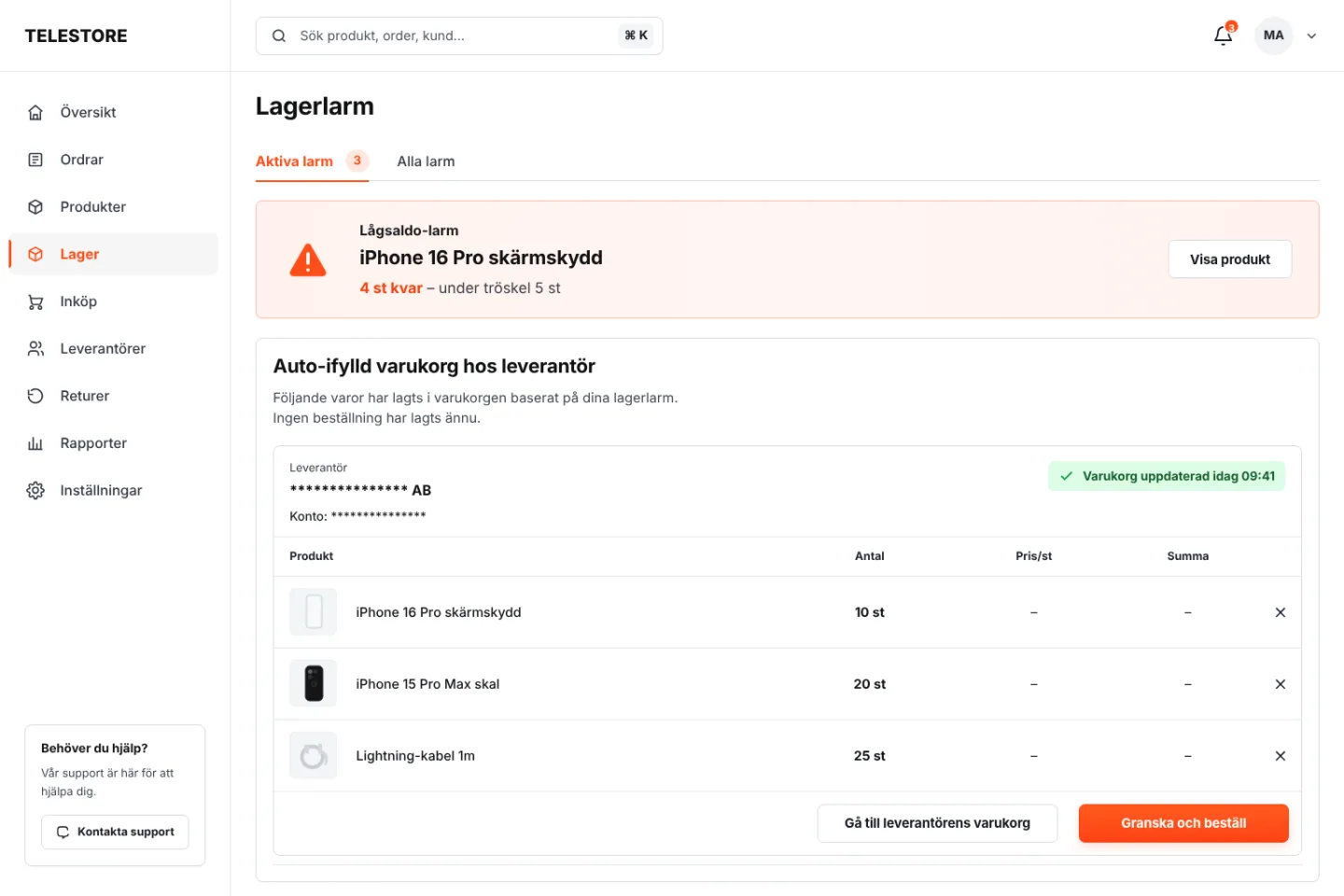
At Telestore there is an alert that watches the stock level against parameters you set yourself. One example: when the screen protectors for a certain model drop below five in stock, the system automatically adds the right quantity to the supplier's cart via their API. But it does not place the order.
A human steps in and bundles several items into one order a few days later, so you avoid paying shipping on every small restock. It is a good example of smart automation: the machine handles the monitoring and the preparation, the human makes the final decision where it actually saves money.
What do you build it with?
You build it with an automation engine, a database, and connections to your systems. Today the smartest choice is often open-source tools you run yourself, so you avoid a per-run fee and let the customer data stay with you.
The stack, part by part
Here is what a modern setup you run yourself looks like:
- Coolify is the host. An open alternative to Vercel or Heroku that you run on your own server, where you start the rest with one click.
- n8n is the automation engine, the part that replaces older tools like Make. It has strong AI-agent nodes, takes no per-run fee, and the flows live in your own infrastructure, which is an advantage for GDPR when you handle customer data.
- Postgres is the database where orders, products, and your parameters live. It is started with one click in Coolify.
- NocoDB puts a table view on top of the database, so a human can easily see and change things, for example set the low-stock thresholds.
The advantage for a smaller e-commerce store is predictable cost: you pay for a server, not per automation, and avoid watching the bill grow with the volume. Telestore was built on the tools of its time, but if we rebuilt it today this is the stack we would choose. An honest caveat: running it yourself takes technical skill and ongoing maintenance. If you do not have that expertise in-house, this is the kind of thing we help companies build and run.
Why are the exceptions the hardest part, and the most important?
An order that goes perfectly is easy to automate. The real work is in the orders that go wrong, and that is where most guides fall silent. An automation that only handles the perfect cases breaks the first time reality hits.
Example: returns and the right of withdrawal
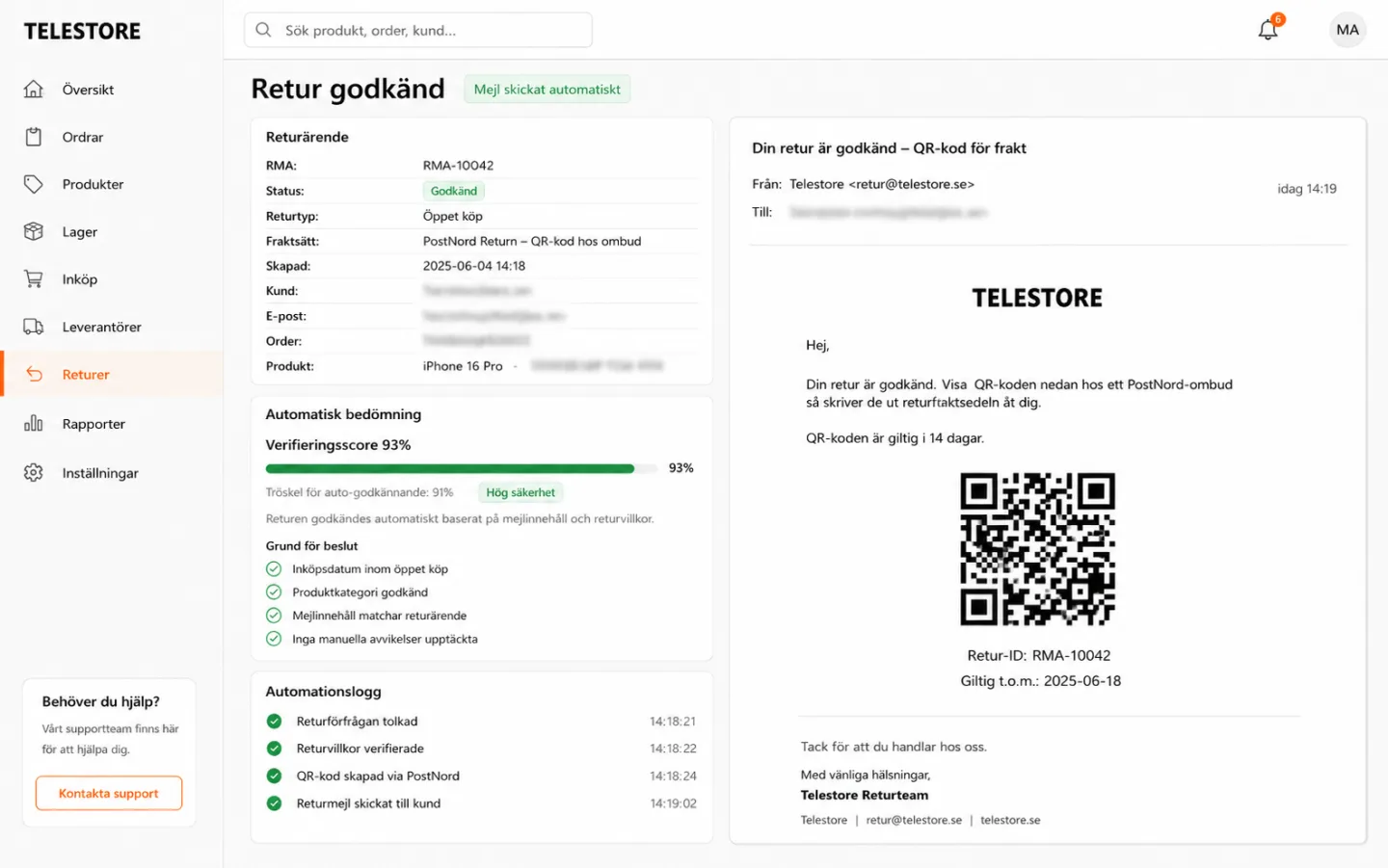
When a customer wants to use their return right, the system automatically checks whether the right still applies, by looking at when the phone was bought and when it was collected, against the store's policy.
If it is within the window, the return is registered automatically and the customer gets an email with the right QR code to send the item back. If it is outside, or unclear, the case is escalated automatically to the right person for a judgment call. The machine does the exact check against the dates, the human only steps in when judgment is genuinely needed. (Sweden's right of withdrawal is 14 days under the Distance Contracts Act, but your store can offer a more generous return policy.)
The same principle applies to other exceptions: an address that does not match, a payment that hangs, a customer who does not respond. Gartner predicts that agentic AI will resolve 80 percent of common customer service issues by 2029, but the remaining twenty are exactly the ones that need judgment. Whoever builds the follow-up for these cases, ideally with tests on exactly when a reminder should go out, gets far more out of it than whoever only automates the perfect order.
The return example above is simplified down to the right of withdrawal. The difference between the statutory right of withdrawal and a voluntary return policy, and how the system should ask when information is missing before it hands off, is covered step by step in our walkthrough of the AI returns handling control chain.
How do you get started?
To automate order handling does not have to be a big project. Start with the step that takes the most manual time today, not with everything at once. For most e-commerce shops that is order confirmation and shipping, or gathering the orders in one place. Measure how long the step takes before you begin, so you can show what you saved afterward.
Take one step, get it stable in production, then expand to the next. One common next flow is reconciling payouts against orders, which is exactly what our guide to matching orders against payouts walks through. The step after that is financial reporting, where the same data is compiled into the quarterly figures. Once the foundation is there, every new flow becomes cheaper to add. If you want to calculate what it is worth for your own volume, use our savings calculator, and if you need to know what a build usually costs, read the cost guide for AI agents.
Frequently asked questions
No. The automation connects to the platform you already have via its API, whether it is Shopify, WooCommerce, or a custom solution. What is decisive is that the systems can be integrated, not which brand they carry.
That is the whole point of a good automation. Exceptions like a wrong address, a hanging payment, or a return are caught and handled according to rules you set, and escalated to a human only when a case needs judgment instead of quietly falling through the cracks.
A common modern choice is open-source tools you run yourself: Coolify as the host, n8n as the automation engine, Postgres as the database, and NocoDB for a table view. The advantage is no per-run fee and that the customer data stays in your own infrastructure.
A first flow, like order confirmation and shipping, is typically in production within a few weeks. If the platform has an open API it goes faster. The time is driven by how many systems need connecting, not by how large the shop is.
An order management system (OMS) owns the order flow, from order to delivery and return, across every sales channel. An ERP (business system) runs finance, purchasing, and inventory across the whole company. Many shops automate order handling by connecting the two, or by letting the automation take the OMS role against the ERP.
Yes, often sooner than you would think. The rule of thumb is volume times time per order: even 30 to 40 orders a week at ten minutes each ties up several hours. Start with one step, measure the time before and after, and let the saving pay for the next. For many shops it pays off at just a few hours of manual order work a week.


AI to work?